SF9 - VP (Virtual Play) Album by SF9 - Available at allkpopmag. Price: $52.86.

SF9 - VP (Virtual Play) Album

Regular price$52.86
/
Shipping calculated at checkout.
  • Worldwide shipping
  • Low stock - 10 items left
  • Backordered, shipping soon

Can I Pay with a Credit Card without a PayPal Account?

Yes, absolutely! You can use a credit card or debit card to pay online even if you don’t have a PayPal account. We’ll guide you through the steps below to make the process simple and smooth.

Step-by-Step Guide to Paying with Your Credit Card

Step 1: You’ll typically receive an invoice from us, which includes a payment link. If you haven’t received an invoice, please request one from our customer service team.

Step 2: Click the payment link in your invoice. You’ll see details about the specific costs, including product prices, shipping fees, and business information. Review this carefully to ensure all information is accurate. If there are any issues, please contact us before proceeding.


Step 3: Confirm that all details are correct. Click the Pay Now button to enter the payment page.

Click Pay Now Button

Accessing the Credit Card Payment Option

On the next screen, you’ll see the PayPal interface.

PayPal Payment Screen

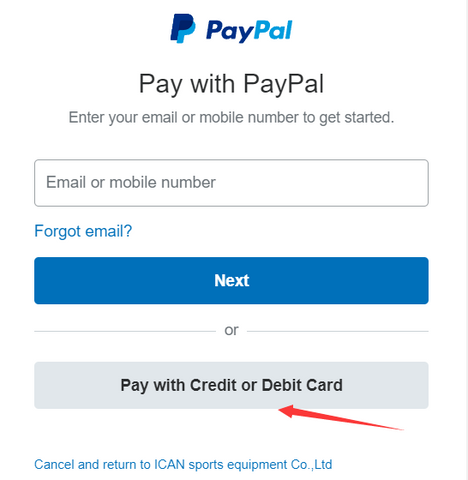
No PayPal account is necessary! Simply click Pay with Debit or Credit Card to proceed to the credit card payment screen.

Choose Pay with Credit or Debit Card

Entering Your Payment Details

Step 5: Enter your credit card information, billing address, and contact details.

Enter Credit Card Details

Step 6: After entering your information, scroll down and select the No, I don’t want an account now option. Then click Pay Now to complete your payment.

Complete Payment without Account


If you can't find your desired option, contact us at

saykikit@gmail.com

or through 'Need help?' below.

We'll update it quickly and send you a $1 thank-you coupon!

This site is protected by hCaptcha and the hCaptcha Privacy Policy and Terms of Service apply.

Brand:SF9

Product Description

* The outer case is just for protecting goods. Scratches and discoloration on the case cannot be the reason for exchanging or returning.

SF9
VP (Virtual Play) Album

* The outer case is just for protecting goods. (scratches and discoloration on the case cannot be the reason for exchanging or returning)

[Contents]
-Premium Box Package (250*150*125)
-SF9 HMD (195*130*105)
-SF9 VP Booklet 32 pages (236*136)
-Booklet Card 9 pages (236*136)
-Photocard 9 pages (85*55)
-Serial Number Card
-Photocard Sticker 1 piece
-Poster 1 type (limited edition)

--------------------------------------------------------------------------------------------------------------------------------
* Notice regarding the Serial Number Card

Thank you for purchasing the SF9 VP
album.

During the album production process, a typo was found on the serial number card,
and to prevent damage due to repackaging, a new serial number card will be provided separately.

Please use the golden serial number card included outside the album package for serial number verification,
and kindly dispose of the serial number card included with the photocards inside the package.

We apologize for the inconvenience and confusion.
We hope you enjoy the SF9 VP album, from Genie Music.

- Genie Music
--------------------------------------------------------------------------------------------------------------------------------

- VP Album Introduction
The VP album is an immersive media album created in the existing album format with the highest quality VR music content, applying cutting-edge technology to enjoy VR music content on smartphones. Once VR content is downloaded through the dedicated VR app player ‘Virtual Play’, it can be enjoyed anytime and anywhere through smartphones and HMDs, along with various photos of the artist and special MDs like HMDs and photocards.

<Precautions> *Must specify
The Virtual Play app for enjoying the [SF9 VP album] works smoothly only on the smartphones specified below and does not work properly on other smartphones.

Compatible smartphones:
SAMSUNG
Galaxy
S8, S8+, S9, S9+, S10, S10+, S10 5G, S20, S20+, S20 Ultra, S21, S21+, S21 Ultra
Note 8, Note 9, Note 10, Note 10+, Note 10+ 5G, Note 20, Note 20 Ultra
A51, A90, A91

LG
V30, V30+, V30 S, V30 S+, V40, V50, V50 S, G7, G7+, G8

iPhone
iPhone X, iPhone XS, iPhone XS Max, iPhone XR, iPhone 11, iPhone 11 Pro, iPhone 11 Pro Max, iPhone 12, iPhone 12 Pro, iPhone 12 Pro Max
* However, iPhone models cannot implement ultra-high-definition VR video due to device specifications, so some ultra-high-definition exclusive UX is not supported.

Due to the characteristics of VR media and individual sensitivity, you may experience motion sickness or dizziness, so long continuous use is not recommended. During long use, depending on the smartphone model, overheating may occur, so if overheating is severe, please pause the use for a while.

<How to Use>
Smartphone settings for using the Virtual Play app
1. Smartphone update: The Virtual Play app works normally on Android 9 or higher, iOS 13.5 or higher. If you have an OS version below this, please upgrade your OS.
2. Resolution adjustment: Please set the smartphone screen resolution to maximum (WQHD or higher). The Virtual Play app provides the highest quality VR, so the screen resolution must be maximized to fully enjoy SF9 VP. (However, the quality is proportional to the smartphone display level, so the quality level may be relatively low on some smartphones with low resolution.)
3. Network connection: The Virtual Play app works only when connected to a network such as Wi-Fi, LTE, or 5G. If you run the Virtual Play app and the content does not appear, please check the network connection status. For users of 5G smartphones (Android), you can also enjoy teaser content via streaming without downloading. If you want to stream teaser content, a 5G network connection is essential, and there may be limitations on streaming teaser content depending on the quality of the 5G network.
4. SF9 VP content is ultra-high-definition VR video content with a very large size. (About 2-4GB per content) Please secure storage space on your smartphone or install external memory such as a Micro SD card. However, generally, the reading speed of the smartphone's internal memory is faster than that of external memory, so using internal memory is recommended. If you use an external memory (microSD) card, please ensure to use an external memory card formatted in exFAT format of SDHC I or higher.

Using the Virtual Play app
1. Preparation: Smartphone, SF9 HMD, serial number, (for verification) email address
2. App download installation: Android users can access the Google Play Store, iOS users can access the App Store, search for ‘VirtualPlay’, download the app, and install it on their smartphones.
3. After installing the app, run the app, and when accessing the SF9 album in Album & Project, a window will pop up to enter the serial number. Enter the provided serial number in this window. (The serial number is on a separate serial number card included with the photocards.) After that, enter your personal email address and proceed with verification to download the SF9 VR content.
4. Content download: Click the download button for each SF9 VP content (total 5 types) to start the download, and you can enjoy the corresponding VP content only after the download is complete. Depending on the network environment, downloading content may take a long time. Content downloads are set to be possible only in Wi-Fi environments to prevent unnecessary data charges. If you turn off the Wi-Fi download only setting, downloads are also possible on LTE / 5G.

Enjoying SF9 VP content
1. Once the download is complete, the play button will be activated. Press the play button and rotate the smartphone horizontally according to the on-screen instructions to insert it into the HMD to play the VR content. Tip. (Using the damper stickers provided with the HMD) make sure the smartphone is placed in the center of the tray.
After wearing the HMD, adjust the focus by moving the two lens adjustment bars on the top of the HMD forward/backward/left/right. Tip. To experience better immersion, it is recommended to use earphones or a headset.
2. While enjoying VR, if you tap the side of the HMD twice with your finger, you can zoom in on the screen. Tapping the side again will return the screen to its original state. If you look down and tap the side of the HMD twice in the same way, a control box will appear to control the video. After placing the cursor in the desired function position on the control box, tap again to use functions such as volume adjustment, playback section movement, screen center movement, and screen zooming in/out. However, this function only works on LG smartphones when using earphones (or headsets).
* However, the above operation method does not work on iPhone.
3. The VR content downloaded on the smartphone can also be viewed as 360-degree video without the HMD. You can check the 360-degree recorded video by rotating the smartphone up, down, left, and right without using the HMD. On Android smartphones, touch ‘3D’ in the upper right corner of the VR playback screen, and on iPhone, touch ‘2D’ in the lower right corner to convert and enjoy the 360-degree video.

[Features and Benefits of the SF9 VP Album]

- Enjoy a total of 5 VR content featuring SF9's representative hit songs and hidden gems in 3D-8K quality
- Easily enjoy VR content anytime and anywhere with just a smartphone and HMD
- A performance directed as ‘a concert for only one person’ in first-person perspective
- Collect special MDs of the artist, including SF9 VP special HMD, photocards, and booklets

 
TRACK LIST

01. O Sole Mio
02. I Yelled
03. Good Guy
04. Summer Breeze
05. My Story, My Song


SF9, Genie Music and VR Album
[SF9 VP Album] Release! Enjoy 'SF9's 3D-8K VR Metaverse for Only One Person'

The boy group ‘SF9’, which has been active both domestically and internationally with a sophisticated concept and elegant performances, announces the VR album [SF9 VP (Virtual Play) Album] in collaboration with Genie Music. The album includes a total of 5 songs, including SF9's representative hit song ‘Good Guy’, the sensuous performance ‘I Yelled’, the addictive ‘O Sole Mio’, and ‘Summer Breeze’, as well as the comforting song for fans ‘My Story, My Song’.

The second VP album [SF9 VP Album], incorporating ultra-high-definition VR technology, reflects the concerns of Genie Music and SF9. Using 360-degree chroma key technology, the elegant and sophisticated performances of SF9 are delivered to fans as a new experience, creating a fantastic metaverse through CG work. Additionally, performances are reconstructed to fit the first-person perspective, enhancing immersion in the performances of SF9 unfolding in virtual space. SF9 invites K-POP fans worldwide to create their own metaverse fantasy in a fantastic space created by 3D-8K VR that does not exist in reality.

The ‘Virtual Play’ app, which allows you to enjoy the [SF9 VP Album], is equipped with the world’s highest quality VR video engine 'Alpha Circle View' upgraded. It has been upgraded to allow existing ultra-high-definition VR video solutions and ‘zoom’ functions, as well as streaming of some content without downloading for 5G network users. Furthermore, through the ‘Virtual Play’ app, not only Android users but also iPhone users can experience SF9's ultra-high-definition VR content.
The 5 tracks of VR content included in the [SF9 VP Album] can be downloaded and played after installing the dedicated app player ‘Virtual Play’ and verifying the user code by accessing the ‘SF9 Album’ in Album & Project. Additionally, the smartphone-specific HMD provided has the SF9 logo printed on it, along with a booklet containing SF9's photos and instructions, photocards, booklet cards, and other special MDs of the SF9 VP album, enhancing the album's collectible value.


- VP Album Introduction
The VP album is an immersive media album created in the existing album format with the highest quality VR music content, applying cutting-edge technology to enjoy VR music content on smartphones. Once VR content is downloaded through the dedicated VR app player ‘Virtual Play’, it can be enjoyed anytime and anywhere through smartphones and HMDs, along with various photos of the artist and special MDs like HMDs and photocards.

<Precautions> *Must specify
The Virtual Play app for enjoying the [SF9 VP Album] works smoothly only on the smartphones specified below and does not work properly on other smartphones.

Compatible smartphones:
SAMSUNG
Galaxy
S8, S8+, S9, S9+, S10, S10+, S10 5G, S20, S20+, S20 Ultra, S21, S21+, S21 Ultra
Note 8, Note 9, Note 10, Note 10+, Note 10+ 5G, Note 20, Note 20 Ultra
A51, A90, A91

LG
V30, V30+, V30 S, V30 S+, V40, V50, V50 S, G7, G7+, G8

iPhone
iPhone X, iPhone XS, iPhone XS Max, iPhone XR, iPhone 11, iPhone 11 Pro, iPhone 11 Pro Max, iPhone 12, iPhone 12 Pro, iPhone 12 Pro Max
* However, iPhone models cannot implement ultra-high-definition VR video due to device specifications, so some ultra-high-definition exclusive UX is not supported.

Due to the characteristics of VR media and individual sensitivity, you may experience motion sickness or dizziness, so long continuous use is not recommended. During long use, depending on the smartphone model, overheating may occur, so if overheating is severe, please pause the use for a while.

<How to Use>
Smartphone settings for using the Virtual Play app
1. Smartphone update: The Virtual Play app works normally on Android 9 or higher, iOS 13.5 or higher. If you have an OS version below this, please upgrade your OS.
2. Resolution adjustment: Please set the smartphone screen resolution to maximum (WQHD or higher). The Virtual Play app provides the highest quality VR, so the screen resolution must be maximized to fully enjoy SF9 VP. (However, the quality is proportional to the smartphone display level, so the quality level may be relatively low on some smartphones with low resolution.)
3. Network connection: The Virtual Play app works only when connected to a network such as Wi-Fi, LTE, or 5G. If you run the Virtual Play app and the content does not appear, please check the network connection status. For users of 5G smartphones (Android), you can also enjoy teaser content via streaming without downloading. If you want to stream teaser content, a 5G network connection is essential, and there may be limitations on streaming teaser content depending on the quality of the 5G network.
4. SF9 VP content is ultra-high-definition VR video content with a very large size. (About 2-4GB per content) Please secure storage space on your smartphone or install external memory such as a Micro SD card. However, generally, the reading speed of the smartphone's internal memory is faster than that of external memory, so using internal memory is recommended. If you use an external memory (microSD) card, please ensure to use an external memory card formatted in exFAT format of SDHC I or higher.

Using the Virtual Play app
1. Preparation: Smartphone, SF9 HMD, serial number, (for verification) email address
2. App download installation: Android users can access the Google Play Store, iOS users can access the App Store, search

Product contents (such as types, options, covers, etc.) may vary depending on the version.

All products are officially distributed as BRAND NEW and FACTORY SEALED packages.

If you need assistance, please contact us at saykikit@gmail.com for a quick response.


Shipping Process

The average processing time is 3 to 10 business days. However, it may vary based on stock availability, holidays, and other factors. For orders with multiple items, the processing time will follow the item with the longest time.

Shipping Time

Express shipping typically takes 3 to 10 days. Tracking may take 1-3 days to update after shipment. We use FedEx, UPS, and K-Packet; shipping costs will reflect the selected courier’s rates.

Merge Orders

We offer the option to merge orders into one shipment. If you prefer separate shipments, please leave a note at checkout.

Tracking Orders

All shipped orders will include a tracking number. Tracking to certain countries may only update upon arrival.

Custom Fees

Import duties are the buyer’s responsibility. In case of refusal or return, duties and shipping charges will be deducted from the refund.

Holiday Shipping

We recommend ordering early for holiday gifts to avoid delays. We are not responsible for delays during holidays.

Returns, Exchanges, and Refunds

Return Policy

Returns must be requested within 10 days of delivery and approved before shipment. Items should be in their original condition. No return shipping fee applies, even for customer errors.

Damaged or Missing Merchandise

Contact us within 10 days of delivery with an unboxing video as proof for missing items or damages.

Exchange Policy

Exchanges are allowed for the same or different products. Price differences must be covered by the customer.

Refund Policy

No refund or reshipment will be provided for failed delivery due to incorrect address. Contact us for corrections.

Cancellation Policy

Cancellations or changes must be made immediately after placing the order. Changes are only allowed if the order is unfulfilled.

Asian Size Conversion

Asian sizes tend to run smaller than US or European sizes. Generally, we recommend choosing 1–2 sizes larger than your usual size. However, each product may have its own sizing, so please check the Size Chart on the specific product page.


Quick Tips for Selecting the Best Size

  1. Consider Fit: Oversized or Fitted?

    Determine if you want a loose or fitted look before measuring. Think about:

    • Is the item designed as oversized, or would you prefer a more fitted style?
    • Choose your size based on these preferences for a better fit.
  2. Measure a Similar Item in Your Wardrobe

    Measuring a similar item you already own can give you a better sense of how the new piece will fit.

    • For example, measure the length of a favorite dress and compare it to the size chart on the product page.
  3. When in Doubt, Size Up

    If you’re between sizes, choosing the larger size gives you more flexibility and reduces the risk of a tight fit.


How to Measure Your Body

  • Bust

    Measure around the fullest part of your bust, placing the tape under your armpits and around your shoulder blades. Keep the tape loose for an accurate measurement.

  • Chest Circumference

    Wrap the tape measure under your armpits, around your shoulder blades, and below your bust.

  • Waist

    Measure around your natural waistline, about 1 inch (2.54 cm) above your navel. Exhale and relax for accuracy.

  • Hip

    Measure around the fullest part of your hips, typically about 8 inches (20.32 cm) below your waist.

  • Shoulder Width

    Measure from one shoulder edge to the other. For better accuracy, have someone help you measure across your shoulder seams.

  • Sleeve Length (Arm Length)

    Hold the tape at your wrist, bend your arm to place your hand on your hip, and measure over the elbow to the shoulder bone.

  • Leg Opening

    Lay your favorite pair of pants flat and measure across the bottom cuff. Multiply by two for the leg opening measurement.

  • Thigh

    Wrap the tape measure around the thickest part of your thigh, just below the buttocks.


Asian to International Size Conversion Chart

Use the following chart to determine your size in US, EU, UK, and Australian terms based on the Asian size. Specific product pages may have additional details.

Asian Size US Size EU Size UK Size Australian Size
S XS 34 6 6
M S 36 8 8
L M 38 10 10
XL L 40 12 12
XXL XL 42 14 14


ALL PRODUCT

The outer case/box is simply for protecting goods. (Damages such as scratches or discoloration on the case/box cannot be compensated.)

RELEASE DATE

The release date can be postponed depending on the manufacturing schedule. You will receive a delay notification email.

FIRST PRESS & PRE ORDER ONLY & SPECIAL GIFT EVENT

As the quantity is extremely limited, the event could end automatically without prior notice.

PRE ORDER ITEM

When you have a preorder item in an order with another item that is already available, your entire order will be held until the preorder item arrives and is in stock. (Items are not sent separately within the same order.)

LUCKY DRAW ITEM

Due to the Lucky Draw printing process, the shipment will be placed after a minimum of 7 business days. You must provide one full unboxing video as proof that any damage on the item was not self-inflicted and occurred during manufacturing. Small spots/dust/scratches on the photo cards cannot be compensated as they are inevitable during the printing process.

SPECIAL GIFT ACCORDING TO PRICE RANGE

When purchased together with other products, a special gift will not be provided. Regardless of discount, the special gift will be provided depending on the subtotal price.

CUSTOM & DUTIES

Please note that import duties, taxes, and charges aren't included in the item price. These charges are the buyer's responsibility.


Recently viewed